Sleek Frames Vector: A Versatile Design Resource for Creative Projects
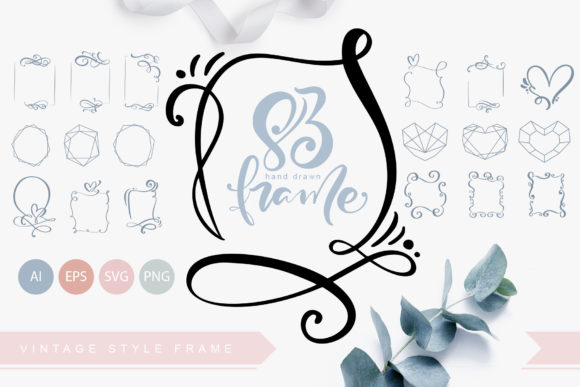
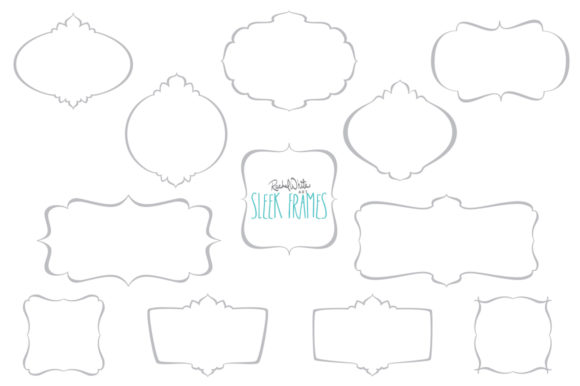
Sleek Frames Vector is a collection of elegant, professionally designed frames created using Adobe Illustrator. These frames are ideal for a wide range of design applications, from printables and logos to web elements and photo framing. Each frame features sweeping, minimalist lines that convey sophistication and modernity, making them a valuable addition to any designer’s toolkit.
The design pack includes 12 distinct frames, each available as a transparent PNG file at 300 dpi. The dimensions of each frame are approximately 6 inches, ensuring compatibility with standard print sizes. Additionally, the set comes with vector files in AI (Illustrator CS6) and EPS formats, allowing for scalable use across different projects and platforms.
What Makes Sleek Frames Vector Distinct?
Sleek Frames Vector stands out due to its combination of aesthetic appeal and technical flexibility. Unlike many generic frame designs, these frames are crafted with precision, offering clean lines and a polished look that can elevate various visual elements. Their transparency makes them adaptable for use on different backgrounds, while the vector format ensures they remain sharp at any size.
One key feature is the ability to customize the color of the frames using image editing software. While the default color is gray, users can easily adjust the hues to match specific branding or design themes. This level of adaptability makes the frames suitable for both personal and professional use.
Comparing Sleek Frames Vector to Other Options
When evaluating design resources, it's important to consider how Sleek Frames Vector compares to similar products. Many frame collections focus on a single style or purpose, such as wedding invitations or web buttons. Sleek Frames Vector, however, offers a broader range of applications, making it a more versatile choice for designers who work across multiple mediums.
Traditional frame designs often come in limited formats, such as raster images that lose quality when scaled. In contrast, the inclusion of vector files in AI and EPS formats ensures that Sleek Frames Vector remains high-quality regardless of the project’s scale. This makes it particularly useful for designers who need scalable assets for both digital and print use.
For those working with Adobe Illustrator, the availability of AI files provides an added advantage. These files allow for easy editing and integration into existing design workflows, whereas some alternatives may require additional conversion steps or third-party tools.
Best Fit Situations for Sleek Frames Vector
Sleek Frames Vector is well-suited for designers who value both aesthetics and functionality. Its versatility makes it a strong option for projects that require a refined, modern look. For example, wedding planners might use the frames for invitations or photo displays, while graphic designers could incorporate them into logos or web buttons.
The frames are also beneficial for creators who need high-quality, customizable assets without the complexity of designing from scratch. By using Sleek Frames Vector, designers can save time while maintaining a professional appearance. This is especially useful for those working on tight deadlines or managing multiple projects simultaneously.
Additionally, the transparent PNG files make it easy to apply the frames to different backgrounds, which is ideal for digital marketing materials, social media graphics, or website elements. The ability to change colors further enhances their usability, allowing for seamless integration with various brand identities.
Limitations and Tradeoffs
While Sleek Frames Vector offers many benefits, it may not be the best fit for every situation. For instance, users who require highly intricate or unique designs may find that the frames lack the complexity needed for certain projects. The minimalist style, while elegant, may not align with all artistic visions or brand aesthetics.
Another consideration is the learning curve associated with vector editing. While the AI and EPS files are compatible with Adobe Illustrator, users unfamiliar with the software may need to invest time in understanding how to modify the frames effectively. This could be a barrier for those who rely on simpler, drag-and-drop design tools.
Furthermore, the design pack focuses on a specific style—sleek, linear frames. Those looking for more ornate or detailed frames may need to explore other options. It’s important to assess whether the frames’ simplicity aligns with the intended use case before making a purchase decision.
When to Choose Sleek Frames Vector
Sleek Frames Vector is a strong choice for designers seeking a reliable, adaptable resource for a variety of projects. If your work involves creating labels, printables, logos, or web elements, the frames can provide a consistent, professional look without requiring extensive customization. Their high-resolution PNG files and vector formats ensure compatibility with most design software and output methods.
For those working on wedding-related projects, the frames offer a subtle yet elegant way to enhance invitations, photo displays, or stationery. Their clean lines and neutral color palette make them a safe and stylish choice for events that prioritize sophistication over boldness.
If you’re looking for a resource that balances quality, versatility, and ease of use, Sleek Frames Vector is worth considering. Its ability to integrate seamlessly into different design workflows and its support for color adjustments make it a practical option for a wide range of creative needs.
Alternatives to Consider
Depending on your specific requirements, there may be alternative resources that better suit your needs. For example, if you prefer more intricate or decorative frames, you might explore design marketplaces that offer a wider range of styles. Similarly, if you work primarily with non-vector formats, you may find that other frame packs provide more direct compatibility with your tools.
For users who prioritize speed over customization, pre-designed templates or stock images may be a faster option. However, these alternatives often lack the scalability and adaptability of vector-based designs like Sleek Frames Vector. It’s important to weigh the tradeoffs between convenience and long-term flexibility when selecting design assets.
Ultimately, the decision to use Sleek Frames Vector depends on your project’s goals, your design preferences, and your workflow. By understanding the strengths and limitations of this resource, you can make a more informed choice that aligns with your creative vision.